> For the complete documentation index, see [llms.txt](https://developers.didomi.io/llms.txt). Markdown versions of documentation pages are available by appending `.md` to page URLs; this page is available as [Markdown](https://developers.didomi.io/api-and-platform/consents/tutorial/collect-and-operate-data.md).
# Collect and operate data
PMP widgets, for instance, are able to collect end-users’ consents and preferences thanks to Didomi Consents API. When an end-user saves changes made on a widget, SDK will be sending a **POST** request to `https://api.privacy-center.org/consents/events`, creating a new consent event in `consents` table.
You don't have to necessarily use the widgets and **you can build your own forms to collect consents and/or preferences from your end-users by using Didomi API**.
Follow this documentation to understand how to operate collected data in your website by fetching our Consents API and display relevant sections to your end-users with their choices. A mention will be made at the end of this guide about how to update an end-user consent state from your website.
## Authentication
* [Authenticate the organization (backend) (1)](#authenticate-the-organization-backend-1)
* [Generate an end-user token (backend) (2)](#generate-an-end-user-token-backend-2)
## Fetch and collect user data
* [Fetch user's choices (3)](#fetch-users-choices-3)
* [Check if consent has been given for a purpose (4)](#check-if-consent-has-been-fiven-for-a-preference-5)
* [Check if consent has been given for a preference value (5)](#check-if-consent-has-been-fiven-for-a-preference-5)
* [Update end-user consent state (6)](#update-user-consent-state-6)
{% hint style="info" %}
Make sure to use our public API for end-users requests while using [https://api.didomi.io](https://api-staging.didomi.io/) for your internal requests in your back-end (sessions, tokens…)
{% endhint %}
## Authentication
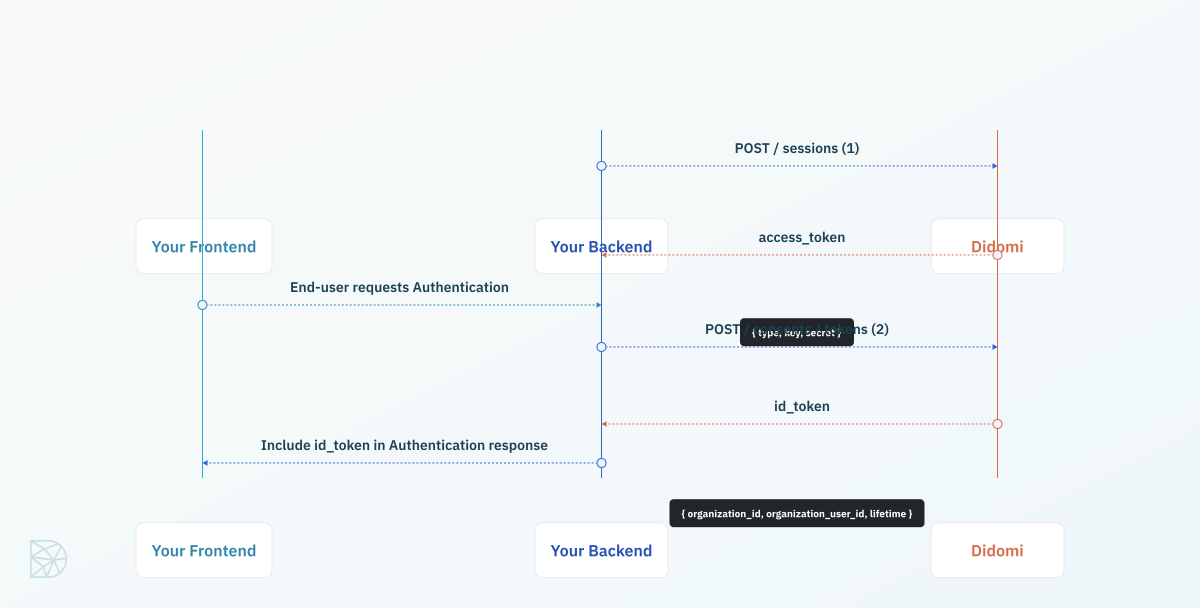
### Authenticate the organization (backend) (1)
First, you need to authenticate your back-end in order to receive a token and make requests to the Consents API. You can find more information regarding Private API Keys [in our developers documentation](https://developers.didomi.io/api/introduction/authentication#authentication-workflow).
{% tabs %}
{% tab title="Javascript" %}
```javascript
import fetch from 'node-fetch';
async function getSessionToken (key, secret) {
const body = JSON.stringify({
type: 'api-key',
key: key,
secret: secret
})
const credentialsRequest = await fetch('https://api.didomi.io/sessions', {
headers: {'Content-Type': 'application/json'},
method: 'post',
body
});
return credentialsRequest.json();
}
const result = await getSessionToken('key', 'secret');
// You can cache the token on your server (result.access_token) to reuse it for future requests
// Don't forget to handle expiration time and token recollection
// The default expiration time is 1 hour
```
{% endtab %}
{% endtabs %}
This `access_token` will grant you access to Didomi APIs and you will be able to create a Consents token on the user’s behalf.
{% hint style="warning" %}
Be careful to never share your key, secret as well as the generated session tokens to anyone.
{% endhint %}
### Generate an end-user token (backend) (2)
Now that we have our organization token, we will use it to generate an end-user token (Consents token) and send it back to our application.
We recommend getting a Didomi token at authentication time and send it back to your frontend so your widget can log your user in and retrieve their consents.
Payload should include:
* `organization_id` can be retrieved in Didomi Console URL (required)
* `organization_user_id` is the unique ID of the end user. It can be an ID, an email address... This is what will allow you to link consent to a user in your DB and needs to be unique. (required)
{% hint style="info" %}
For a given user, you need to generate a token with a unique ID (organization\_user\_id). Make sure to generate a Didomi token only from endpoints of your API when the user is already authenticated on your end. Example /me or /users.
{% endhint %}
* `lifetime` is a token lifetime in seconds (optional)
{% hint style="info" %}
We recommend setting a lifetime that is equal to potential other tokens you send on the front-end or any sessions. So that the user will log out at the same time from both APIs.
{% endhint %}
In your authentication controller, send a **POST** request to `/consents/tokens` endpoint.
```json
POST https://api.didomi.io/consents/tokens?organization_id=
PAYLOAD
{
"organization_id": "",
"organization_user_id": "",
"lifetime": 3600,
"metadata": {
...
}
}
RESPONSE
{
"organization_id": "",
"organization_user_id": "",
"lifetime": 3600,
"metadata": {
...
},
"id_token": "..." // End user token (Consents token)
}
```
The Didomi API will respond with the created token in the `id_token` field.
This `id_token` is what we call a Consents token. This token belongs to one of your users and allows them to change their consent and preferences.
Add the token retrieved to your authentication endpoint response so your frontend can consume it and call the Consents API.
{% tabs %}
{% tab title="Javascript" %}
```javascript
async function getConsentsToken (token, organization_id, organization_user_id) {
const body = JSON.stringify({
organization_id,
organization_user_id,
})
const request = await fetch(`https://api.didomi.io/consents/tokens?organization_id=${organization_id}`, {
method: 'post',
body,
headers: {
'Content-Type': 'application/json',
Authorization: `Bearer ${token}`
},
});
return request.json();
}
const consentToken = await getConsentsToken(result.access_token, 'org', 'org_user_id');
```
{% endtab %}
{% endtabs %}
## Fetch and collect user data
### Fetch user's choices (3)
{% hint style="info" %}
For a given user, you need to retrieve his current consents to purposes available in notices and widgets from PMP.
{% endhint %}
As a customer of Didomi (Consents API needs to be activated), you can retrieve your user consents and use them to display relevant section on your website for example.
You need to query consent users that belong to your organization (`organization_id`), and filter by user ID or organization user ID (`organization_user_id`).
```json
GET https://api.privacy-center.org/consents/users?organization_id={organization_id}&organization_user_id={organization_user_id}
RESPONSE
{
"data": [
{
"id": "user_id",
"organization_user_id": "organization_user_id",
"consents": {
"purposes": [
{
"id": "ubereats-8LW3mZ6J",
"metadata": {},
"enabled": true,
"values": {
"TY6Hmpbw": {
"value": "NVebxkGR,Dn2Cc6Rt"
},
"t9PheWBL": {
"value": "tLLDAKwC"
}
},
"preferences": [],
"channels": []
}
]
}
}
],
"limit": 100,
"cursor": null
}
```
This code snippet shows you how to query user’s consents. You need to pass `organization_id` and `organization_user_id` as options.
{% tabs %}
{% tab title="Javascript" %}
```javascript
async function fetchConsents (organizationId, organizationUserId) {
// We assume here that you have a token stored in LocalStorage either with our Authenticate method or your own way
const token = window.localStorage.getItem('didomi_consents_token')
if (!token) {
alert('you need to login first')
return;
}
const headers = new Headers({
'Content-Type': 'application/json',
'cache': 'no-cache',
'Authorization': `Bearer ${token}`
})
const consentGivenUrl = `https://api.privacy-center.org/consents/users?organization_id=${organizationId}&organization_user_id=${organizationUserId}`
const consentGivenRequest = await fetch(consentGivenUrl, { headers })
const consentResponse = await consentGivenRequest.json()
return consentResponse.data[0].consents
}
const consents = await fetchConsents('org', 'org_user_id');
```
{% endtab %}
{% endtabs %}
### Check if consent has been given for a purpose (4)
{% hint style="info" %}
For a purpose, you want to check if the user has given his consent or not in order to display a section accordingly with his choice.
{% endhint %}
Purposes are stored in `consents` object and come in an `array`.
For each consent, `enabled` property allows you to know if the user has given his consent to this specific purpose.
* `true`: the end user has given his consent
* `false`: the end-user has not given his consent
* `null`: the end-user has not answered to this purpose
This code snippet shows you how to check if your user has given his consent for a given purpose (`purposeId`).
{% tabs %}
{% tab title="Javascript" %}
```javascript
// consents option corresponds to consents fetched from GET /consents/users endpoint
// purpose_id option corresponds to the purpose ID for which you need to know if the consent has been given or not.
// isConsentGiven fonction return `true` or `false` and allows you to display a section accordingly with consent of your end-user
async function isConsentGiven (consents, purposeId) {
return consents.purposes.find(purpose => purpose.id == purposeId).enabled
}
if (isConsentGiven() === true) {
// Display HTML Block
}
```
{% endtab %}
{% endtabs %}
### Check if consent has been given for a preference (5)
{% hint style="info" %}
For a preference, you want to check if the user has selected or not a value in order to display a section accordingly with his choice.
{% endhint %}
Preference values are stored in `values` object of a purpose.
For each preference with at least one value selected, you have a:
* `selectedPreferenceId` (as key)
* object with values (`valueId`(s) in a `string` separated by comas (`,`) in `value` property)
```javascript
{
values: {
selectedPreferenceId1: {
value: 'valueId1,valueId2'
}
}
}
```
This code snippet shows you how to check if your user has selected an option (`valueId`) of a given preference (`preferenceId`).
{% tabs %}
{% tab title="Javascript" %}
```javascript
// consents option corresponds to consents fetched from GET /consents/users endpoint
// preferenceId option corresponds to the ID of a selected preference
// valueId option corresponds to the ID of a value for which we want to check if it has been selected or not
// hasValueBeenSelectedForPreference fonction returns a boolean and allows you to display a section accordingly with the preference of your end-user
async function hasValueBeenSelectedForPreference (consents, preferenceId, valueId) {
const { purposes } = consents
const hasValueBeenSelected = purposes.some(purpose => {
const preferenceValue = purpose.values[preferenceId]
if (preferenceValue) {
const valuesSelected = preferenceValue.value.split(',')
return valuesSelected.includes(valueId)
}
return false
})
return hasValueBeenSelected
}
if (hasValueBeenSelectedForPreference(consents, 'preferenceId', 'valueId') === true) {
// Display HTML Block
}
```
{% endtab %}
{% endtabs %}
### Update user consent state (6)
{% hint style="info" %}
For an end-user, you wanto update a set of purposes and preferences from a selection he made from your website or application.
{% endhint %}
Update end-user consent state from API standpoint (or basically collect data from end-user) means creating a consent event to register the new user choices by calling the **POST** `/consents/events` endpoint.
* To update state of a purpose, you can set `enabled` property to `true` if the user has given his consent and `false` if has not given his consent.
* To update state of a preference, you can add in `value` property all choices selected by the end-user by filling in the related `valueId`.
```json
POST https://api.privacy-center.org/consents/events?organization_id={{organization_id}}
PAYLOAD
{
"user": {
"organization_user_id": "user@didomi.io"
},
"consents": {
"purposes": [
{
"id": "purposeId",
"enabled": true || false,
"values": {
"selectedPreferenceId1": {
"value": "valueId1,valueId2"
},
"selectedPreferenceId2": {
"value": "valueId3,valueId4"
}
}
}
]
}
}
```
This code snippet shows you how to update your user consent state. To create an consent event, you need to pass the ID of your organization (`organizationId`), the unique ID of your user (`organizationUserId`) and new consents (`consents`).
{% tabs %}
{% tab title="Javascript" %}
```javascript
// consents option corresponds to consents fetched from GET /consents/users endpoint
// selectedPreferenceId1 option corresponds to the ID of a selected preference
// valueId option corresponds to the ID of a value for which we want to check if it has been selected or not
async function updateConsentStatus (organizationId, organizationUserId, consents) {
const body = JSON.stringify({
user: {
organization_user_id: organizationUserId
},
consents
})
const createConsentEvent = await fetch(`https://api.privacy-center.org/consents/events?organization_id=${organizationId}`, {
headers: {'Content-Type': 'application/json'},
method: 'post',
body
});
return createConsentEvent.json();
}
updateConsentStatusForPurpose('didomi', 'user@didomi.io', {
purposes: [
{
id: "purposeId",
enabled: true || false,
values: {
selectedPreferenceId1: {
value: "valueId1,valueId2"
},
selectedPreferenceId2: {
value: "valueId3,valueId4"
}
}
}
]
});
```
{% endtab %}
{% endtabs %}
---
# Agent Instructions
This documentation is published with GitBook. GitBook is the documentation platform designed so that both humans and AI agents can read, navigate, and reason over technical content effectively. Learn more at gitbook.com.
## Querying This Documentation
If you need additional information that is not directly available in this page, you can query the documentation by asking a question.
Perform an HTTP GET request on the following URL with the `ask` and `goal` query parameters:
```
GET https://developers.didomi.io/api-and-platform/consents/tutorial/collect-and-operate-data.md?ask=&goal=
```
`ask` is the immediate question: it should be specific, self-contained, and written in natural language.
`goal` is what the user is ultimately trying to achieve, the reason they need the answer. Sharing it helps GitBook give you a better, more relevant answer. A goal is most helpful when it describes the outcome the user wants rather than restating the question. For example, with `ask=how do I create an API token`, a goal like `automate deployments from our CI pipeline` lets GitBook tailor the answer to that use case.
The response will contain a direct answer to the question and relevant excerpts and sources from the documentation.
Use this mechanism when the answer is not explicitly present in the current page, you need clarification or additional context, or you want to retrieve related documentation sections.
.svg?alt=media)